
Compatibility & quantity rules
Rules work on [choice slots](/docs/bundleboss/choice-slots/) and are part of the Builder.
What rules do
Section titled “What rules do”A rule makes one slot’s choice control what another slot may offer, using the tags, categories or attributes already on your products. Nothing new to model: tag your products once and the rules maintain themselves, so a new product with the right tags obeys existing rules automatically.
Rules read like a sentence:
If [Processor] has [Tag: amd] then [Motherboard] must have [Tag: amd]
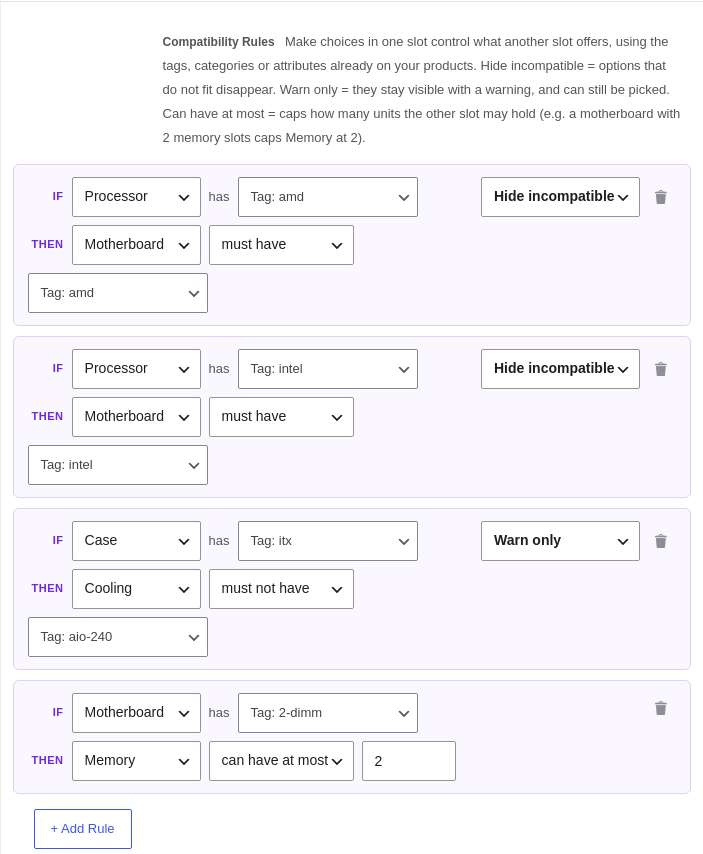
Compatibility rules
Section titled “Compatibility rules”Each rule sets what the target slot’s options need:
- must have / must not have a given tag, category or attribute value.
- Hide incompatible: options that do not fit disappear, and are blocked on the server too.
- Warn only: they stay selectable but carry a warning badge.
When the customer changes the controlling choice, the affected slots refresh, and a chosen product that no longer fits is cleared with a short explanation.
Quantity rules
Section titled “Quantity rules”The same rule cards can cap a quantity instead of filtering options:
If [Motherboard] has [Tag: 2-dimm] then [Memory] can have at most [2]
Quantity rules are always enforced (there is no warn mode for a physical limit), they only ever tighten, and a slot’s own Min always wins, so a misconfigured rule can never make a bundle unbuyable. On the storefront the stepper clamps live with a note like “Limited to 2 by your Motherboard choice”, and lifts again if the controlling choice changes.
Setting rules up
Section titled “Setting rules up”- Tag your products so the relationships exist (for example tag processors and boards
amdorintel). - Save the bundle so its choice slots exist to connect.
- Add a rule per relationship: a Hide rule each way for platform fit, a quantity rule for a physical cap.
Server enforcement is the authority. Whatever a customer's browser does, an add-to-cart that breaks a rule is refused, so an invalid build can never reach checkout.
A worked example: PC builder
Section titled “A worked example: PC builder”- One choice slot per component: Processor, Motherboard, Memory, and so on.
- Tag by platform, then two Hide rules: if Processor has amd, Motherboard must have amd, and the same for intel.
- A physical cap as a quantity rule: if Motherboard has 2-dimm, Memory can have at most 2.
The seeded Custom PC Builder demo is set up exactly this way, including a warn-mode example, so you can copy it.